

Please Help ,my normal map isn't applying correctly
Posted: May 13, 2012
Post subject: Please Help ,my normal map isn't applying correctly
Post subject: Please Help ,my normal map isn't applying correctly
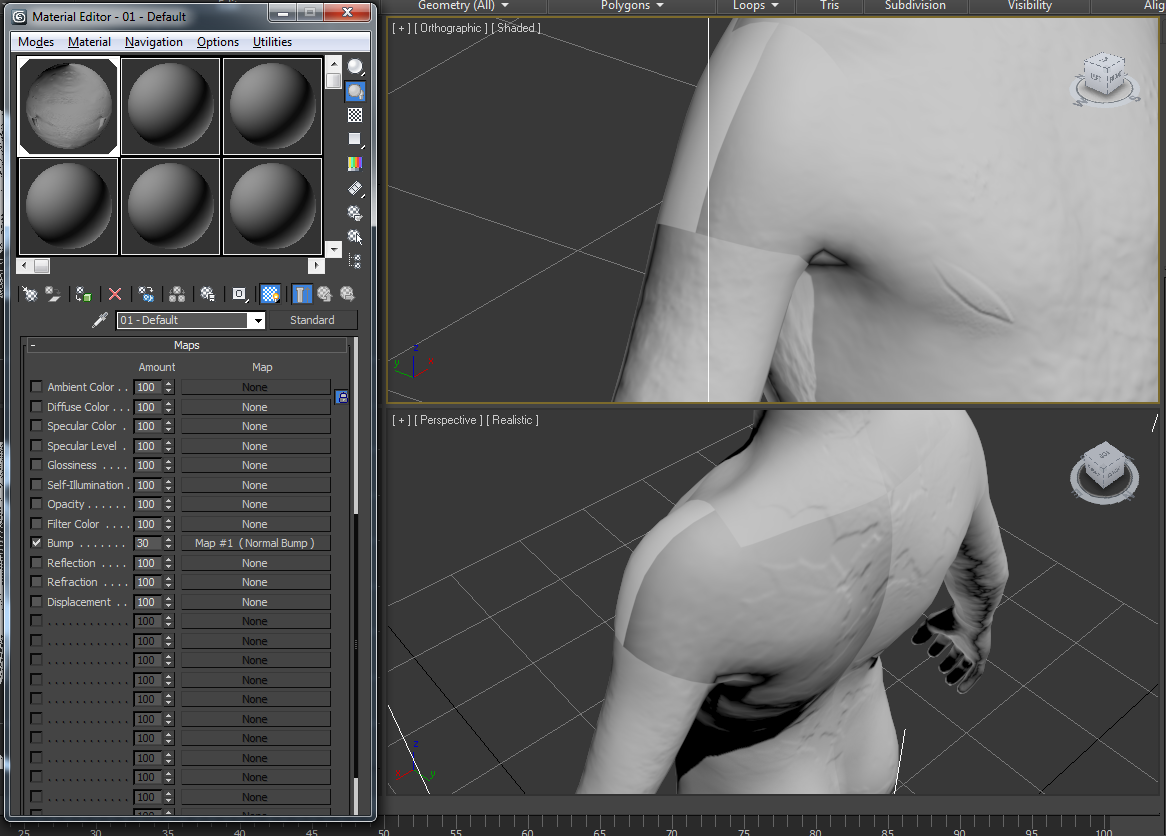
Hi people im getting some weird shading defects in 3ds max when i apply a normal map on a model its as if the uv maps have randomly shifted , i baked the normals map in mudbox and applied it with a standard material Please give some tips on normal map baking and applying
Posted: May 14, 2012
Post subject:
Post subject:
Posted: May 15, 2012
Post subject:
Post subject:

It looks like your UVs have some mirrored portions, i.e. the normals are facing in the opposite directions. Mudbox can not handle such UVs properly.
At least I had similar issues when some of my UV elements were mirrored.
At least I had similar issues when some of my UV elements were mirrored.
Posted: May 17, 2012
Post subject:
Post subject:
I hadn't have such problems but I've had some few days ago. I've made texture and bump layers. Texture worked fine in max but bump didn't. My character has empty area in the center of his back and some mess where legs are connecting with body part. Problem is solved but it's strange that there are two maps made in one file and aren't working both same way when use same UV. Freaky and it was pain in my ass for a while.
Posted: May 28, 2012
Post subject:
Post subject:
ah got it to work ,, i first took it into max ,re uv maped it and took it back into mudbox with the mudbox preset , and exproted the normal map again after making the highpolly
Posted: January 14, 2015
Post subject:
Post subject:
It looks like your UVs have some mirrored portions, i.e. the normals are facing in the opposite directions. Mudbox can not handle such UVs properly.?????????
___________________
GuL
___________________
GuL