

New to texture art - I don't know where to start.
Posted: August 27, 2009
Post subject: New to texture art - I don't know where to start.
Post subject: New to texture art - I don't know where to start.
Hello, everybody!  I'm in a bit of a pickle as you can tell from the title; I'm a beginner to texture art and I'm utterly lost as to a good place to learn how to make textures. I use GIMP meaning I can't follow most of the photoshop tutorials very well (I'm somewhat of a newbie at GIMP).
Please do forgive me if the forum is littered with this question, however I checked the two pages of topics on the texturing subforum and I didn't see any.
So if any of you splendid people could be so kind as to point me in a good direction, I'd be deeply appreciative!
Thanks for reading and all the best.
I'm in a bit of a pickle as you can tell from the title; I'm a beginner to texture art and I'm utterly lost as to a good place to learn how to make textures. I use GIMP meaning I can't follow most of the photoshop tutorials very well (I'm somewhat of a newbie at GIMP).
Please do forgive me if the forum is littered with this question, however I checked the two pages of topics on the texturing subforum and I didn't see any.
So if any of you splendid people could be so kind as to point me in a good direction, I'd be deeply appreciative!
Thanks for reading and all the best.
Posted: August 27, 2009
Post subject:
Post subject:

What exactly do you mean by texture art?
Do you want to be able to create generic tillable textures that can be used for many people. Similar to what you can find on our site or do you want to be able to create custom textures for specific characters and other 3d objects so that you can find a job in 3d industry?
In any case you should be knowing your photo editing software very well be it Gimp or Photoshop.
Posted: August 28, 2009
Post subject:
Post subject:
Both, preferably. But especially characters.
Please do forgive me if I sound somewhat demanding; but I'm eager to learn both character textures and tileable textures. I'm insatiably curious and willing to learn. ^^
But what I'm essentially looking for is a good starting point to "show the ropes" to me. Thanks a lot for the help so far.
Please do forgive me if I sound somewhat demanding; but I'm eager to learn both character textures and tileable textures. I'm insatiably curious and willing to learn. ^^
But what I'm essentially looking for is a good starting point to "show the ropes" to me. Thanks a lot for the help so far.
Posted: August 28, 2009
Post subject:
Post subject:
If you are eager to learn something you will eventually learn it, no matter what.
So for low polygonal character texturing you need to be able to apply proper UV maps or unwrap the 3d model.
Here is a video tutorial for UV mapping in wings 3d:
&feature=fvw
And a video tutorial for UV mapping in Blender 3d:
- this is a short one without sound but it is straight to the point.
So the oldest and most traditional way is to export your UV map as an image.
It should look something like this but without the texture only the wires:
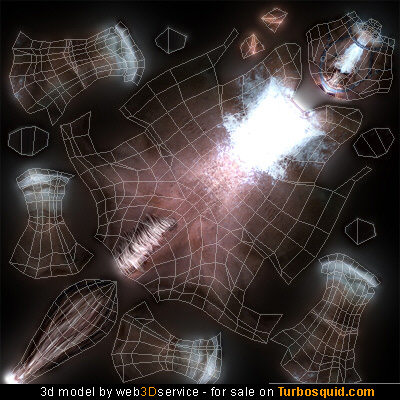
Then open it in GIMP or Photoshop and paint all the details other those lines. Then save the texture apply it to the model in your 3d program and see what you get. If you don't like it go back and make all the corrections and so on until you get what you want. The thing is that you need good painting skills to create good character textures.
There are more advanced methods that I will discuss with you when you try this one and show here what you got.
Regarding the tileable textures it is quite simple really. Epsecialy in GIMP.
Just take any more or less uniform photo like wood, metal or concrete.
Open it in Gimp and apply the Make seamless filter:
Filters -> Map -> Make seamless.
Save what you have got.
Thats all, you have a seamless tillable texture
So for low polygonal character texturing you need to be able to apply proper UV maps or unwrap the 3d model.
Here is a video tutorial for UV mapping in wings 3d:
&feature=fvw
And a video tutorial for UV mapping in Blender 3d:
- this is a short one without sound but it is straight to the point.
So the oldest and most traditional way is to export your UV map as an image.
It should look something like this but without the texture only the wires:
Then open it in GIMP or Photoshop and paint all the details other those lines. Then save the texture apply it to the model in your 3d program and see what you get. If you don't like it go back and make all the corrections and so on until you get what you want. The thing is that you need good painting skills to create good character textures.
There are more advanced methods that I will discuss with you when you try this one and show here what you got.
Regarding the tileable textures it is quite simple really. Epsecialy in GIMP.
Just take any more or less uniform photo like wood, metal or concrete.
Open it in Gimp and apply the Make seamless filter:
Filters -> Map -> Make seamless.
Save what you have got.
Thats all, you have a seamless tillable texture
Posted: August 28, 2009
Post subject:
Post subject:
Thanks a ton! The UV mapping tutorial seems like it could be really helpful.
Also, what is a good way to practice using seams in Blender? ^^
But also, where can I learn to actually paint the textures?
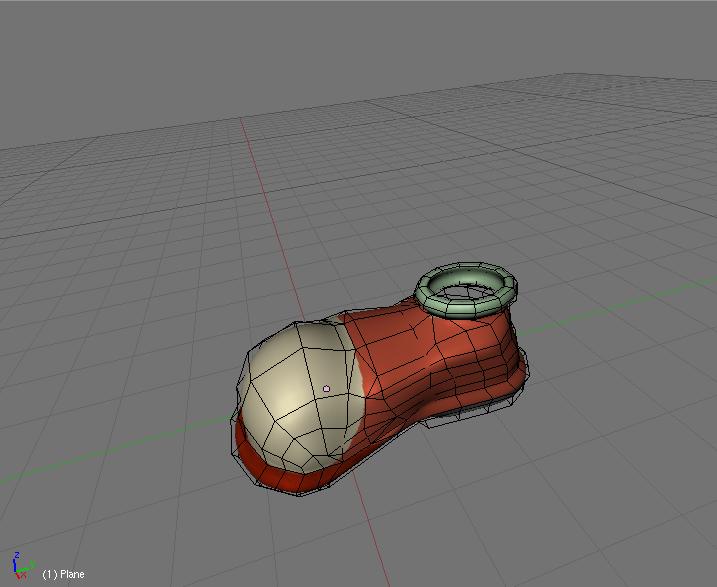
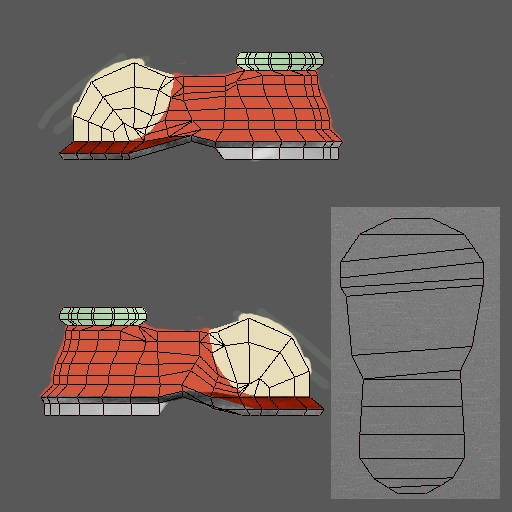
Yay! I did it! Here are the screenshots.
They aren't spectacular; but they're a good start I think.
Also, what is a good way to practice using seams in Blender? ^^
But also, where can I learn to actually paint the textures?
Yay! I did it! Here are the screenshots.
They aren't spectacular; but they're a good start I think.
Posted: August 29, 2009
Post subject:
Post subject:
Yes it's a good start.
Well you should be practicing painting in general and 3d model painting in particular to get good at it.
There is not much to teach, you should practice it a lot and that's all.
Well you should be practicing painting in general and 3d model painting in particular to get good at it.
There is not much to teach, you should practice it a lot and that's all.
Posted: October 12, 2009
Post subject:
Post subject:
hey, i am new to hear, but saw a lot of interesting staff and topic here. Hope to know new people here