

That simple but somehow difficult to make arm
Posted: July 28, 2009
Post subject: That simple but somehow difficult to make arm
Post subject: That simple but somehow difficult to make arm
I'm working on making human models, and have found the arm to be rather difficult, unlike hands and feet where they just look wrong, but you can still tell they are hands and feet, the arm eternally seems to look like a flat tube. at most i end up making them look like legs.
Do any of you know any good tricks for this body part?
Do any of you know any good tricks for this body part?
Posted: July 28, 2009
Post subject:
Post subject:

If we don't consider the technicality 3d modeling is just like drawing. Anyone can take a pencil and draw some lines but not anyone can draw a beautiful realistic picture. That's what you should learn... you already know how to handle the pencil now you have to learn how to use it to achieve great results. Study your hand in the mirror. Look for references online.
 - from the book "Constructive Anatomy" by George B. Bridgman.
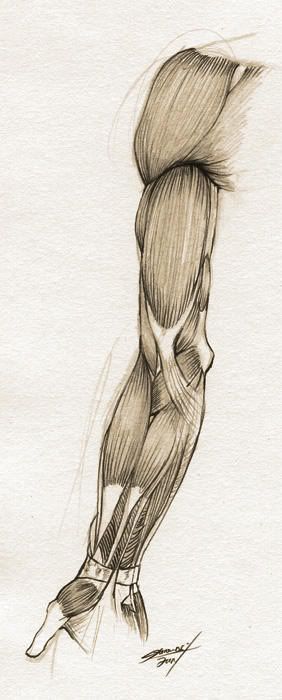
 - from a great human drawing tutorial
Posted: July 28, 2009
Post subject:
Post subject:

Posted: July 28, 2009
Post subject:
Post subject:
i can only make straight lines for armatures o.O how do you simulate the two bones that bend and rotate in the lower arm
Posted: July 29, 2009
Post subject:
Post subject:
I thought you were talking about modeling an arm..
There are many tricks for rigging the lower arm though. The easiest is to use 2 consecutive bones. What I mean is add a bone between the forearm and the palm and use it to control the rotation of the forearm on its axis.
You can adjust the lower arm mesh weight so that it deforms smoothly.
This is the simplest method and it has it's limits.
Here is a video tutorial with a more complex approach for Maya:
http://www.vimeo.com/2877971
BTW can you attach an image with your 3d model?
There are many tricks for rigging the lower arm though. The easiest is to use 2 consecutive bones. What I mean is add a bone between the forearm and the palm and use it to control the rotation of the forearm on its axis.
You can adjust the lower arm mesh weight so that it deforms smoothly.
This is the simplest method and it has it's limits.
Here is a video tutorial with a more complex approach for Maya:
http://www.vimeo.com/2877971
BTW can you attach an image with your 3d model?
Posted: August 05, 2009
Post subject:
Post subject:
sorry couldn't get online for a short bit, i was talking about modeling but when you mentioned the two bones rotating around each other i was confused how you would make that work for armatures.
Here's an attachment of the arm, it just doesn't seem to look right; and when i try making an armature it also kind of flattens out like a pancake at the joints.
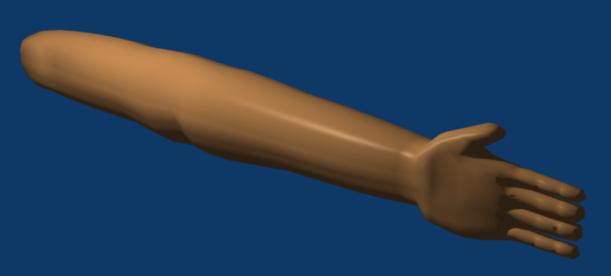
Here's an attachment of the arm, it just doesn't seem to look right; and when i try making an armature it also kind of flattens out like a pancake at the joints.
Posted: August 06, 2009
Post subject:
Post subject:
The 2 bones in the picture just show why the arm has the form it has. 
But it is useful to understand the skeleton to be able to deform the arm properly when animating.
I have attached an image with a suggested correction for your arm form.
It is not exact just to show you in which direction to go. I would advice you to use the images I posted previously as top and side reference when you model.
Do you know how to use images as reference?
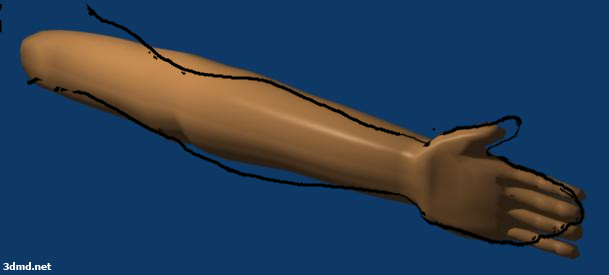
But it is useful to understand the skeleton to be able to deform the arm properly when animating.
I have attached an image with a suggested correction for your arm form.
It is not exact just to show you in which direction to go. I would advice you to use the images I posted previously as top and side reference when you model.
Do you know how to use images as reference?
Posted: August 07, 2009
Post subject:
Post subject:
I have practiced using an image as a reference for the face, but usually have a hard time locating references that have the same image from two different angles.
I'll try using those images as a reference and see how it works. thanks
I'll try using those images as a reference and see how it works. thanks