

credit crunch interior
Posted: May 20, 2009
Post subject: credit crunch interior
Post subject: credit crunch interior

i am new and this is my first post. HI 
this is a little dentist entrance i did i wanted to do something that reflected todays situation. created in cinema 4d and bodypaint and rendered using fryrender
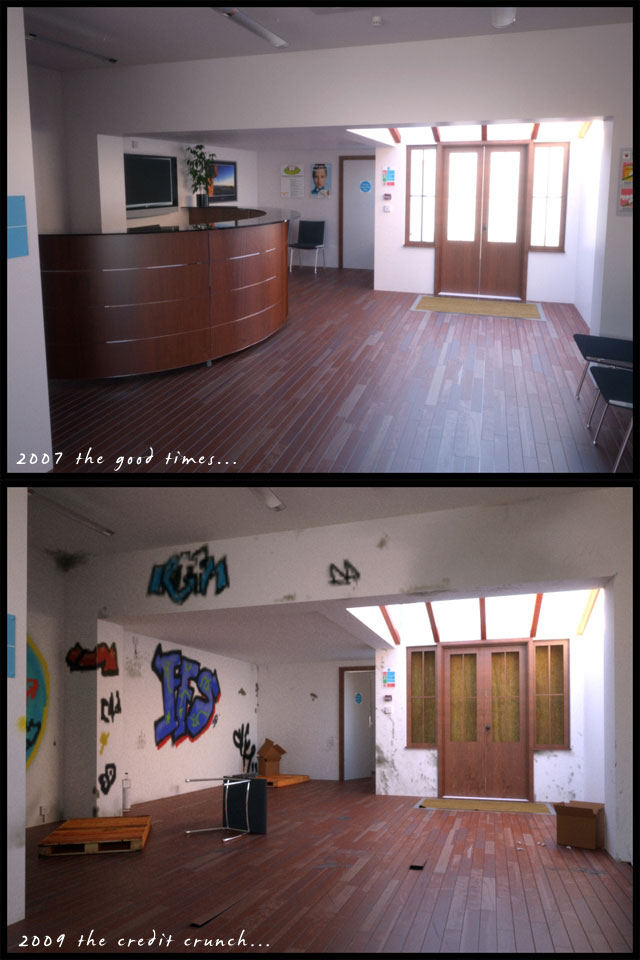
this is a little dentist entrance i did i wanted to do something that reflected todays situation. created in cinema 4d and bodypaint and rendered using fryrender
Posted: June 06, 2009
Post subject:
Post subject:
I love this scene! Very topical
I should try fryrender...
Btw the noise in the second image is it because of the crisis?
Very topical
I should try fryrender...
Btw the noise in the second image is it because of the crisis?
Posted: June 06, 2009
Post subject:
Post subject:
yes and remember fryrender is only pc
Posted: June 08, 2009
Post subject:
Post subject:
Thank you, renderpimp. I'm working on a PC actually.
Posted: June 22, 2010
Post subject:
Post subject:
Nice picture. I recommend you add more vandalisms on the second picture so that it would look very trashed.
_________________
My Animation Services
_________________
My Animation Services
Posted: July 02, 2010
Post subject:
Post subject:
Heh, those vandals are actually pretty kind, a paint job and some wet rags will clean that stuff right up. If I were a vandal in this picture I would have put some holes in the wall and set fire to part of the building just for kicks.
Posted: August 27, 2010
Post subject:
Post subject:
Lol @ TanadrineStudios.
I think it would be better that way except on the setting it on fire.
That would really trash the place.
The holes would look good.
But I do not seem to find where the desk is.
Did people steal it ?
and how ?
_________________
My Animation Services
I think it would be better that way except on the setting it on fire.
That would really trash the place.
The holes would look good.
But I do not seem to find where the desk is.
Did people steal it ?
and how ?
_________________
My Animation Services
Posted: September 01, 2010
Post subject:
Post subject:
I love how you could take the same layout and switch up the scene by a little change in model and textures. Very nice.
Posted: February 27, 2011
Post subject:
Post subject:
Cool! great job! excellent work
Posted: April 26, 2011
Post subject:
Post subject:
Very nice, but have a question about details - the door in the seconf picture looks like another door (can be mistaken, but) and the chair - it looks like new. And the floor is still tidy. But the idea is very good - I like it. Well done!
Posted: July 19, 2011
Post subject:
Post subject:
looks very realistic. is this bloom efect post? or is it direct out of the renderer?
Posted: July 20, 2011
Post subject:
Post subject:
I am also of the opinion that it looks really realistic. I like it.
Posted: November 01, 2011
Post subject:
Post subject:
Nice pictures,those are looking nice..the work done there pretty good...i like it and appreciate you!the colors combination is well and good....Thanks for sharing this.
Posted: November 03, 2011
Post subject:
Post subject:
Very nice work. I like what you did
Posted: November 16, 2011
Post subject:
Post subject:
Nicely done, simple and effective
Posted: December 21, 2011
Post subject:
Post subject:
i love the way you use lighting and the position of subject in scence
Posted: January 03, 2012
Post subject:
Post subject:
Great use of lighting here! Good work. Very realistic.
Posted: January 04, 2012
Post subject:
Post subject:
how did you attach your image? in filename you found the jpg and hit "add image"? It keeps telling me the file size I've attached is too large...
Posted: January 08, 2012
Post subject:
Post subject:
Great work! The scene is nicely detailed and the render is beautiful. I like the touch of humour too, great work.
Posted: January 21, 2012
Post subject:
Post subject:
hahahahahaha!!!!! (the laugh its because of the image concept, it's a great idea, made a strange laugh on my face)
I think it is a wonderful job... very real!
I think it is a wonderful job... very real!