

Renderproblem: Can't see object through Glass
Posted: May 17, 2009
Post subject: Renderproblem: Can't see object through Glass
Post subject: Renderproblem: Can't see object through Glass
Hello 3D artists! I'm making a bowl with fruit for school but i've run into a kind of wierd problem
As you see in the image attached, you see the cylinder through the glass, but not the orange. But the orange does cast a shadow trough the bowl.
Some info: The cylinder is created in maya and assigned to mia material
the orange is created in zbrush, mapped and textured then imported to maya.
How do i make the orange visible through the bowl and how can i make the oranges shadow not opaque.
Help is extremly appreciated
Thanks!
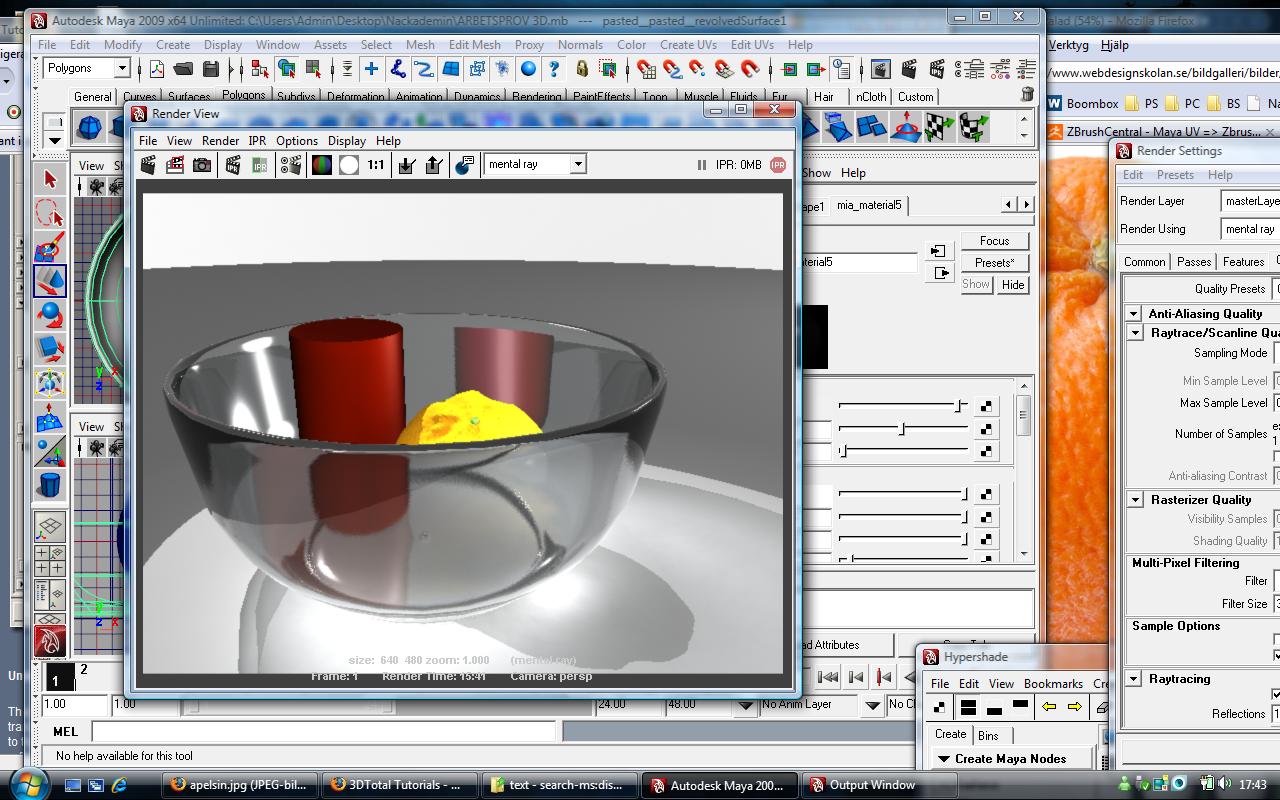
As you see in the image attached, you see the cylinder through the glass, but not the orange. But the orange does cast a shadow trough the bowl.
Some info: The cylinder is created in maya and assigned to mia material
the orange is created in zbrush, mapped and textured then imported to maya.
How do i make the orange visible through the bowl and how can i make the oranges shadow not opaque.
Help is extremly appreciated
Thanks!
Posted: June 03, 2009
Post subject:
Post subject:

Regarding the opaque reflection just make the amount of reflection smaller or add a falloff or gradient to the reflection amount attribute so that it reflects less when the surface is perpendicular to the camera direction and more when it is parallel to the camera direction. You can also add a Fresnel effect to the reflection if it is available in Maya.
Posted: June 24, 2012
Post subject: the answer made me feel stupid.
Post subject: the answer made me feel stupid.
Hey,
I just went nuts trying to figure this same problem out. I created a water bottle, with a straw in it, but the straw and anything else that went inside the bottle disappeared. Same with particles. And then after searching I found a suggestion that made me feel very stupid. The object in the attribute ediotor didn't have the visible in refractions, or visible in refelctions checked off. And I feel silly.
I just went nuts trying to figure this same problem out. I created a water bottle, with a straw in it, but the straw and anything else that went inside the bottle disappeared. Same with particles. And then after searching I found a suggestion that made me feel very stupid. The object in the attribute ediotor didn't have the visible in refractions, or visible in refelctions checked off. And I feel silly.
Posted: June 25, 2012
Post subject:
Post subject:
Hey suspendednyc,
Good point I didn't think about it.
Welcome to the forums!
Good point I didn't think about it.
Welcome to the forums!