

Maya: How to create a "bump". (picture attached)
Posted: March 13, 2009
Post subject: Maya: How to create a "bump". (picture attached)
Post subject: Maya: How to create a "bump". (picture attached)
hai all,
I was modeling a car with a guidance of some tutorial. But in the tuto, i don't get how they created a "bump" as in the picture attached.
do i have to split polygon at the edge into two? or detach?
Regards.
Orga
Software = Maya 2008
Skill = Beginner
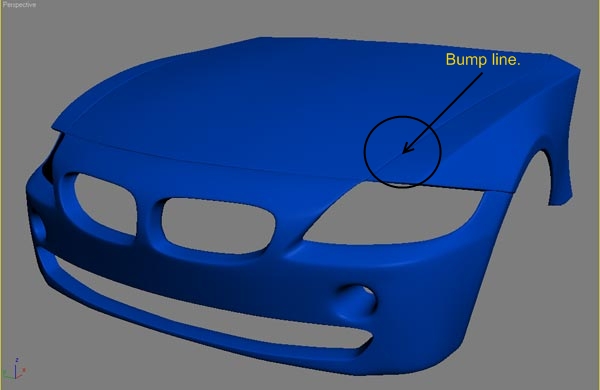
I was modeling a car with a guidance of some tutorial. But in the tuto, i don't get how they created a "bump" as in the picture attached.
do i have to split polygon at the edge into two? or detach?
Regards.
Orga
Software = Maya 2008
Skill = Beginner
Posted: June 10, 2009
Post subject:
Post subject:

You can do it several ways.
One is to extrude the entire hood surface inwards, inset a little, then extrude outwards.
Another is to add more edges then move them in the right places.
You can as well use crease or weight properties of the edges, I forgot how they are called in Maya.
Another method is to split the hood perimeter so that it is a separate object, and then model it to show some thickness, this is the best method if you want to make an animation where you will open the car hood. In general when you have the overall form of the car ready, extracting the parts that are separate in real life is a good practice. This way you can animate them and add more details to individual parts without affecting the rest of the model.