

Help setting up F-22A Flaps for Animating...
Posted: February 27, 2008
Post subject: Help setting up F-22A Flaps for Animating...
Post subject: Help setting up F-22A Flaps for Animating...
Having issues with animating. I am fairly new to animating... I usually just do still frams so I haven't needed to learn. But, I am working on a mod for Crysis that involves a lot of land/sea/air models. And, of course I need them animated. So, I opologize if this is a "noob" question. But, here it goes. lol
I am currently trying to set the pivot points for the flaps of the wings on an F-22A Raptor. I can get the flap to pivot next to the wing, but it's not pivoting in line with wing the way it should. I hope the pictures I put below will help explain what I'm talking about. Any help with this would be great!
Here is a link to my flickr.com page with the pics I'm referring to. If further information is required to help, let me know.
*EDIT: I'm Using 3DS MAX 9
http://www.flickr.com/photos/16203629@N08/sets/72157603995075570/detail/
I am currently trying to set the pivot points for the flaps of the wings on an F-22A Raptor. I can get the flap to pivot next to the wing, but it's not pivoting in line with wing the way it should. I hope the pictures I put below will help explain what I'm talking about. Any help with this would be great!
Here is a link to my flickr.com page with the pics I'm referring to. If further information is required to help, let me know.
*EDIT: I'm Using 3DS MAX 9
http://www.flickr.com/photos/16203629@N08/sets/72157603995075570/detail/
Posted: September 07, 2009
Post subject:
Post subject:

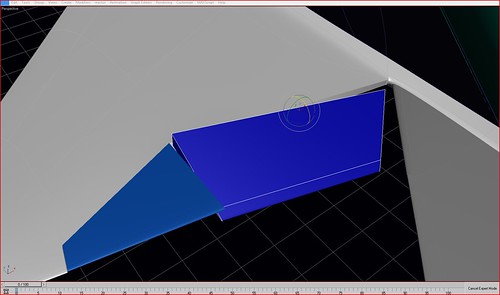
You should just align the pivot axis to match the axis around which you are going to rotate.
Posted: October 23, 2009
Post subject:
Post subject:
i think that it is easyer and better for you to use VUe 6