

Verts not sitting where they are suposed to , 3ds max
Joined: 13 May 2012
Posts: 4
Posts: 4
Posted: May 28, 2012
Post subject: Verts not sitting where they are suposed to , 3ds max
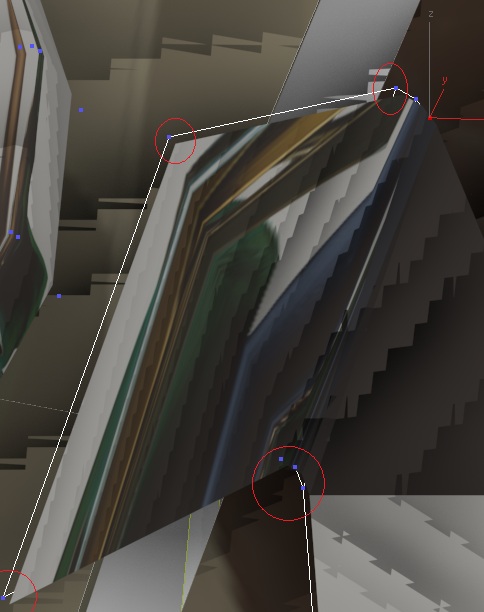
hi i was modeling as usual and saved my work , right after i was using the conform tool i exited max and reloaded the file just for some memory cleanup i opend up the file and continued modeling and then this happanned ,, the mesh alsow jumps but the actual faces stay in the original place , and when selecting the mesh alsow sits in another place i have to select about a cm below a vert when i want to select it , its realy difficult to select and move
Strange. What version of 3ds max are you using?
Also write the computer specs, it could be related to a weak video card.
To be sincere it's the first time I see something like this in 3ds max, and I have worked in almost all of them.
_________________
Andyba, 3d artist
skills: 3d modeling, texturing, rendering, 3d character animation, compositing
3d software experience: 3ds max, Maya, Softimage XSI, Deep Paint 3d, Body Paint 3D, Wings 3D, Z Brush
2d software experience: Adobe Photoshop, Adobe After effects, Macromedia Flash, Freehand
Also write the computer specs, it could be related to a weak video card.
To be sincere it's the first time I see something like this in 3ds max, and I have worked in almost all of them.
_________________
Andyba, 3d artist
skills: 3d modeling, texturing, rendering, 3d character animation, compositing
3d software experience: 3ds max, Maya, Softimage XSI, Deep Paint 3d, Body Paint 3D, Wings 3D, Z Brush
2d software experience: Adobe Photoshop, Adobe After effects, Macromedia Flash, Freehand
| Previous topic | Next topic |
3d artists |
3d jobs |
Free Textures |
Photo References |
3d Gallery |
3d Tutorials |
Post a Job offer |
FAQ
Powered by phpBB | hosted by Royal Web Hosting | CG archive | Privacy policy


