

Help with 2D illustration
Posted: February 26, 2010
Post subject: Help with 2D illustration
Post subject: Help with 2D illustration
Hey!
Im working together with an illustrator to create a female illustration. There will be 2 images of this illustrated person, from front and profile view. The front turned out great, but the profile view did not turn out good at all. The profile view is supposed to be the exact same person as the front, just from different angle, the look and everything else should be identical.
We have tried for weeks to fix the profile view so it looks exactly like the front but we can't seem to get it right. I know there's a lot of skilled artists here, so im here to ask for help.
Could someone please help us to do a few corrections on the profile view or at least tell us what needs to be changed?
Best Regards,
Hansen
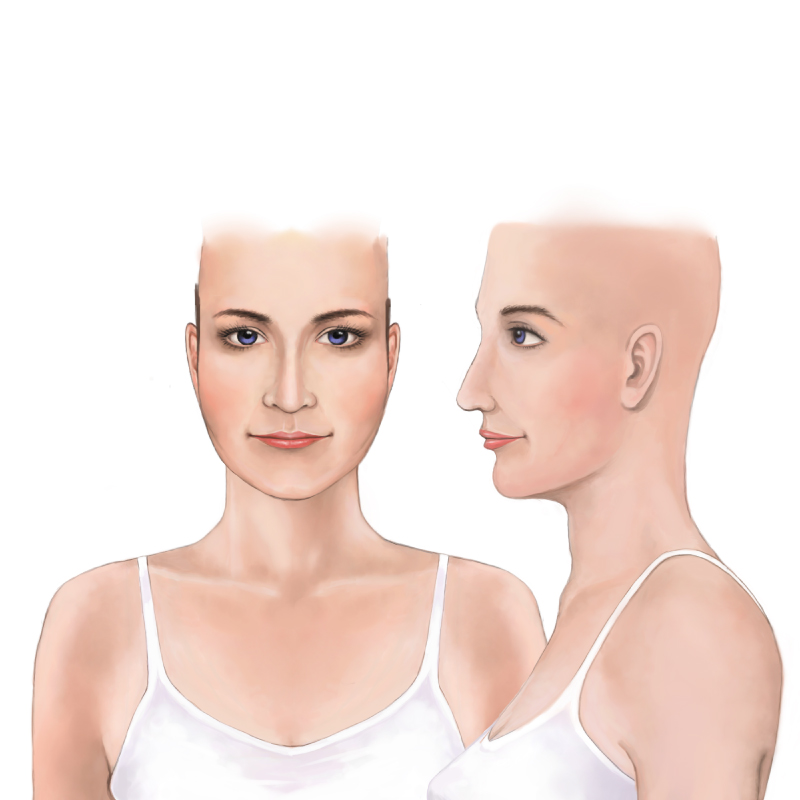
Im working together with an illustrator to create a female illustration. There will be 2 images of this illustrated person, from front and profile view. The front turned out great, but the profile view did not turn out good at all. The profile view is supposed to be the exact same person as the front, just from different angle, the look and everything else should be identical.
We have tried for weeks to fix the profile view so it looks exactly like the front but we can't seem to get it right. I know there's a lot of skilled artists here, so im here to ask for help.
Could someone please help us to do a few corrections on the profile view or at least tell us what needs to be changed?
Best Regards,
Hansen
Posted: August 17, 2010
Post subject:
Post subject:
.. i have to say.. i wish i knew where your problem is .. it actually looks pretty good .... her nose is not exactly nice, but you would never be able to tell that from the front angle.
Remember that some profiles are not exactly flattering in contrast to the front... in real life.
Good luck to you though, i think you did good

Posted: August 17, 2010
Post subject:
Post subject:

The problem with the profile view is that it is not a real profile view.
judging by the eye brows and forehead she is somewhat turned like a 3/4 view while the rest of the face is drawn as if it is a real profile view.
Is this a real human do you have any references? If so it would help if you show them.
The ear should be a bit wider as well as the back of the head. Now it looks as if it is scaled down horizontally.
judging by the eye brows and forehead she is somewhat turned like a 3/4 view while the rest of the face is drawn as if it is a real profile view.
Is this a real human do you have any references? If so it would help if you show them.
The ear should be a bit wider as well as the back of the head. Now it looks as if it is scaled down horizontally.
Posted: August 17, 2010
Post subject:
Post subject:
.. i would like to follow up with something trivial, as it's not exactly the matching of the profile and the frontal...
... but the colorization is off a bit from the head to the neck (and body) on the frontal view
... and it seems you have used a 'hard line' to outline the jaw and chin rather than to shade it, which almost creates a 'cartoony' effect ...
may not like seem like such a big deal, but once someone see's one thing wrong with a picture or a job, human nature is to look for more.. it could only help to polish those areas up a bit.
Best of luck
... but the colorization is off a bit from the head to the neck (and body) on the frontal view
... and it seems you have used a 'hard line' to outline the jaw and chin rather than to shade it, which almost creates a 'cartoony' effect ...
may not like seem like such a big deal, but once someone see's one thing wrong with a picture or a job, human nature is to look for more.. it could only help to polish those areas up a bit.
Best of luck
Posted: August 31, 2010
Post subject:
Post subject:
Yes exactly! I agree with what 3dDomainNames said. At first look, it may seem okay or close to perfection, but after we talk about something wrong, we looked for anything wrong, until it connects with the other. But it is for the betterment of your project, so Good luck to you
_________________
My Animation Services
_________________
My Animation Services